
Say you found a Shopify store doing exactly what you want to do. You need their product list: titles, prices, variants, images, the full catalog. Selecting it by hand and pasting it into a spreadsheet takes hours and breaks halfway through. Most scraper tools want a subscription, an account, or a few lines of code before they hand you anything.
You don't need any of that. This guide covers the fastest free way to export Shopify products to a CSV, and the manual trick too, in case you want to know how it works under the hood.
1. The manual way (and why it's painful)
Every Shopify store exposes a hidden endpoint:
https://anystore.com/products.jsonOpen that in your browser and you'll see raw product data in JSON. It works, but it has real limits:
- It returns only 250 products per page, so big stores force you to add
?page=2,?page=3, and keep going. - The output is JSON, not a spreadsheet, so you still have to convert it.
- You can't filter by collection or search for specific products.
- Some stores disable it entirely.
Fine for a quick peek. Not fine when you actually need the data organized and usable.
2. The easy way: ShopProductScraper
ShopProductScraper is a free Chrome extension that handles all of this for you. No account, no payment, no code. You open a store, click the icon, and export. That's the whole thing.
 Step 1 — Install it
Go to the Chrome Web Store and add ShopProductScraper to your browser. It installs in a couple of seconds.
Step 2 — Pin it
Click the puzzle-piece icon in your Chrome toolbar and pin ShopProductScraper. Now it sits one click away on every page instead of buried in a menu.
Step 3 — Open any Shopify store
Go to the store you want to look at. Your own, a competitor's, a supplier's. Any Shopify storefront works.
Step 4 — Click the extension icon
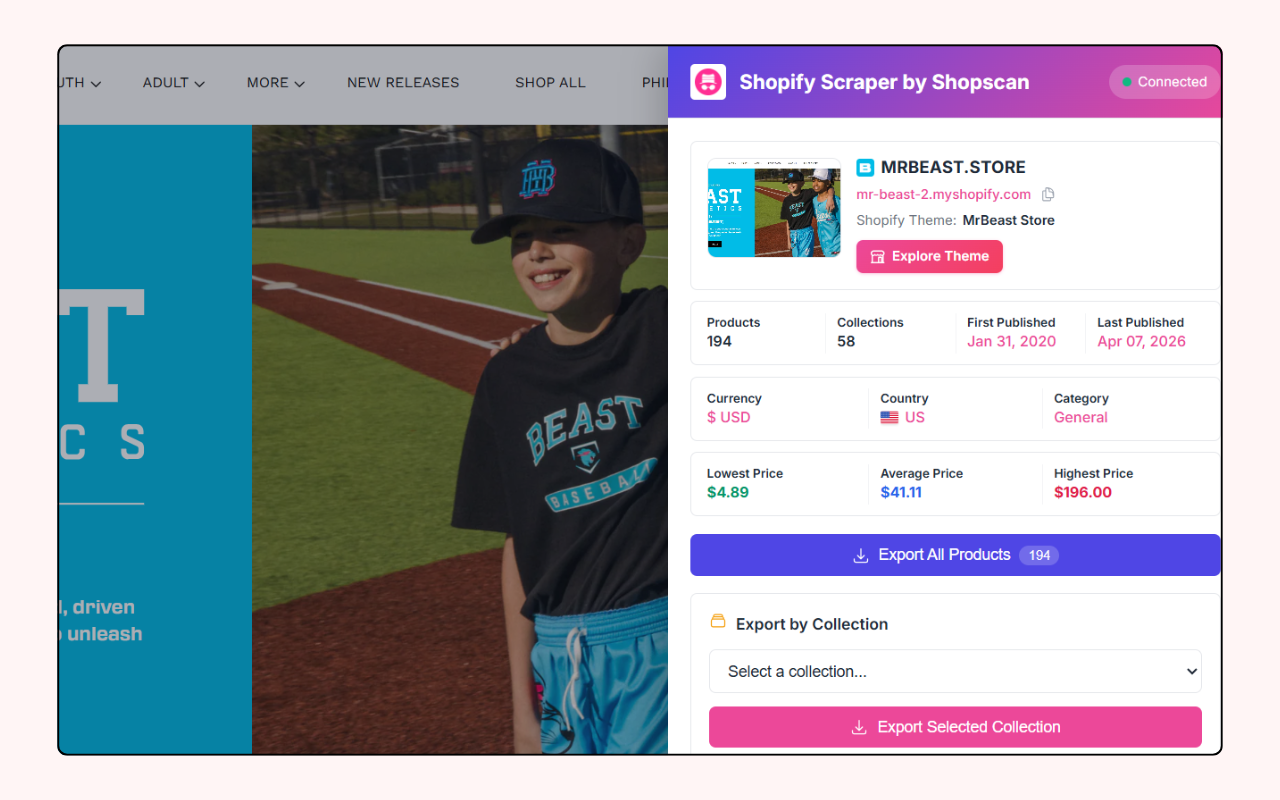
Click the ShopProductScraper icon. A panel opens with a full store overview:
- Location. Where the store is based.
- Creation date. How long the store has been running.
- Theme. Which Shopify theme it uses.
- Apps. The apps installed on the store.
That overview alone is useful. You can size up a store in seconds. A brand-new shop on a free theme is a very different competitor than a five-year-old store stacked with premium apps.
Step 5 — Browse and export the products
Below the overview, you'll see the store's products. From here you get three ways to export, and all of them produce a clean CSV file:
- Export by collection. Pick a collection and pull every product in it. Best when you only care about one category.
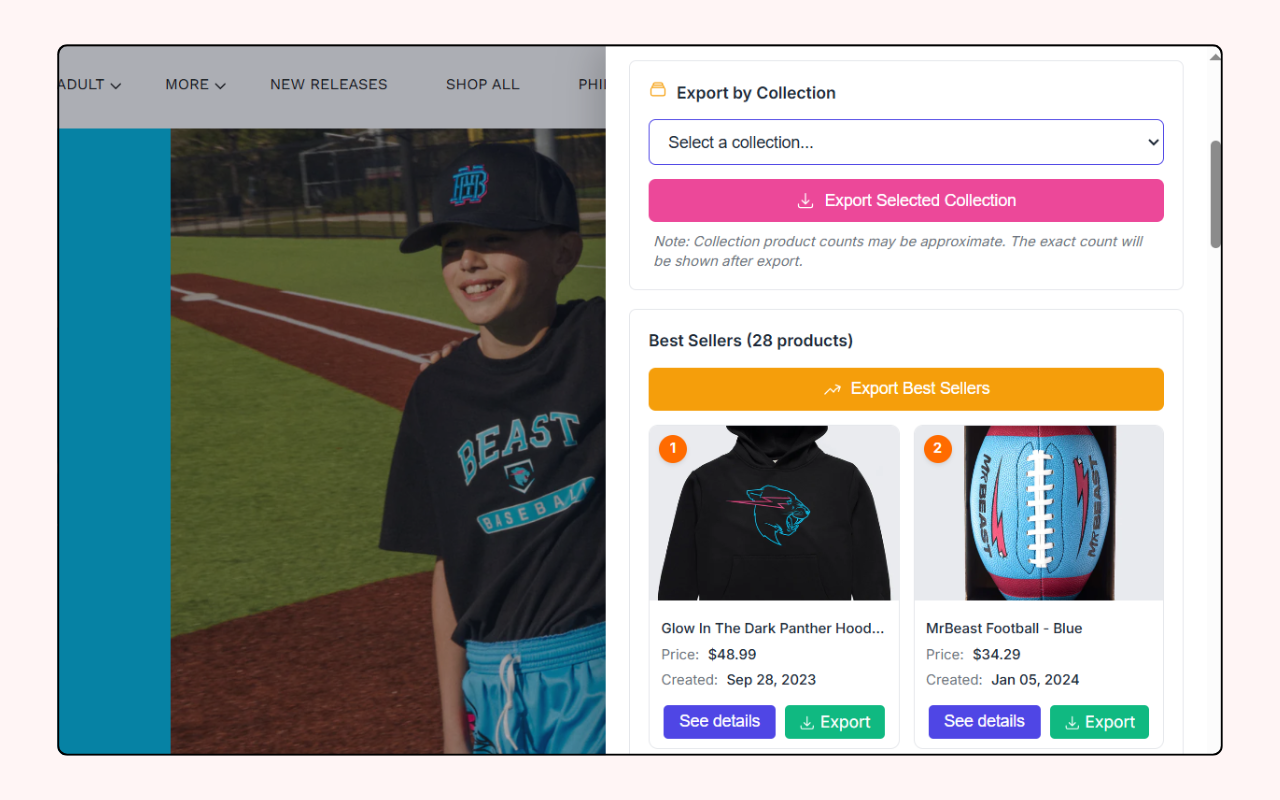 Single product export. Grab one specific product with all its details.
- Search and export. Search products by keyword and export just the matches.
Every export is a standard CSV, so it opens straight in Excel, Google Sheets, or Numbers. No conversion, no cleanup.
And to be clear: the whole thing is free. Every feature, every export, no row limits hiding behind a paywall.
Which method should you use?
| Need | Best option |
|---|---|
| Quick one-time peek | /products.json in the browser |
| A full catalog in a spreadsheet | ShopProductScraper |
| One category only | Export by collection |
| A few specific items | Search and export |
| Store research, not just products | The extension's store overview |
For anything past a 30-second look, the extension wins, mostly because you skip the JSON-to-spreadsheet step entirely.
Is scraping Shopify products legal?
Public product data, meaning the titles, prices, and images shown on a storefront, is generally fine to collect. Price-comparison sites do it every day. The sensible rules:
- Stick to public storefront data. Don't try to reach customer info, orders, or anything behind a login.
- Don't hammer a store with thousands of rapid requests.
- Use the data for research, sourcing, or analysis, not to clone someone's brand wholesale.
ShopProductScraper only reads what's already public on the page, so you stay on the right side of this by default.
Bottom line
Scraping Shopify products doesn't need code, subscriptions, or copy-paste marathons. The /products.json trick is handy for a quick look. For real work, meaning a full catalog, a single collection, or a targeted search, install ShopProductScraper, pin it, open a store, and click. You'll have a clean CSV in under a minute, for free.